Links: friedrice.fun
On Jun 3, 2026, I registered a new domain, friedrice.fun.
friedrice.fun is basically my own site, but for everything that isn’t professional or coding/technical related. So my food reviews, my airport lounge reviews, any random experience I feel like writing about, and probably just images of random things I come across.
By Jun 5, I had a fully optimized blogging setup that meant I could write posts from my phone or laptop, and have them auto-published. Zero extra coding for things like adding a new listing page, or customizing sidebars. And all of this was done in under 2 hours of passive “agentic” (vibe) coding while I was eating Bettergoods Ultra Thin Pepperoni and Ricotta Pizza.
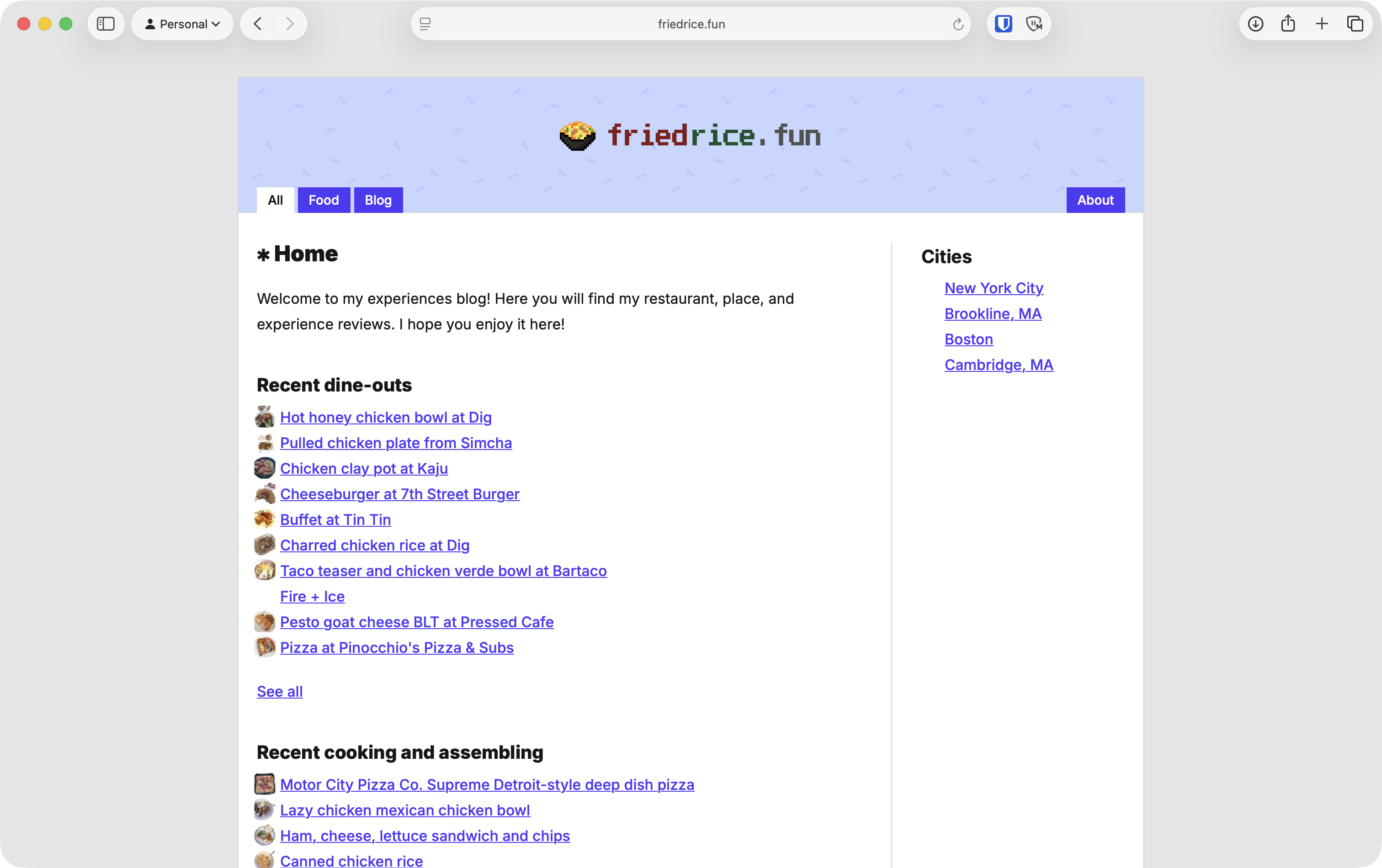
So what? This site is super simple
It is very simple, but there is a bit going on behind the scenes:
- Image loading. By default, image loading creates layout shift, especially if you scroll down and an image loads above you. I added lazy loading and conversion from PNG/JPG to WebP to make them slightly faster. I also added a blurred image as a placeholder so it looks slighly nicer as it’s loading. And there’s a script to add width/height explicitly
- Image thumbnails. Most pages, especially the food ones, have a tiny image thumbnail. This is a 64x64 pre-generated image. I was originally using the same image on the page and for the thumbnail, just that the thumbnail has the background removed. But this made loading extremely slow.
- Obsidian vault support. Obsidian is the CMS, so I couldn’t rely on Astro content. I had to build a Remark plugin to support “
[[” wiki-links and Obsidian tags - Obsidian bases. These are kind of like Notion databases. Normally, to make a new listing page, say a page that gathers all my airport lounge reviews in one place, I’d have to write code to go find and collect those posts. With bases, I just describe the list once in Obsidian and the page builds itself, no custom code needed.
- Image grid support. I love how the Obsidian Minimal theme can support image grids, so I added that to the markdown parser too. See it in action on this page, with the images on the same row rather than one under the other.
Note that when I say “I made”, I mean “My agent and I made”.
The publishing flow
This is my flow for adding a new page after dining out / cooking something new. I wanted to try to remove all the friction I could. The more friction I have, the less likely I am to keep it updated.
- Eat the food. Preferably take pictures before I finish eating.
- Open my phone, open Obsidian, and make a note for that food item. I keep everything in one folder, so there’s no need to figure out where to put the file. I just need to give it the appropriate tag like
#dining-outor#cooked-meal. - Write. Paste the images I took
- Use Google Photos / Apple Photos to copy the image without the background. I’m so glad that this is so easy now. So I can make the icon/thumbnail image without having to open my laptop
- Wait for it to publish.
I have the Obsidian vault on iCloud, so it syncs between my Mac and iPhone.
- Thrice a day, the vault is pushed to a GitHub repo. I used Bun’s new built-in cron for this.
- The content repo dispatches an action to the code repo to trigger a new build.
- The code repo starts the build process. While building on GitHub, it fetches the content from the other GitHub repo. But while building the site locally, it uses the local content.
Is it worth it?
There definitely are a lot of moving parts. I wish it were easier to do all the image stuff, parse the markdown properly, and just have a more out-of-the-box good experience where I can write content on my phone or laptop and still own all my data.
But, yes, to me it’s 100% worth it. If there are issues, I’m sure I can fix them. Not that there have been any major issues. Since I control every part of the process, I can customize it however I want.
If I used something like Wordpress, I’m not sure if making this would have been that easy.
And just because I could, I made a custom page at https://friedrice.fun/invite-someone-for-fried-rice. Write your name there, then copy the link and share it with a friend. Try it out!
But I still think it should be easier
I still wish it were easier to make content sites like this. I’ve built a few similar-ish ones before:
- National Service Resources: resources for guys going through National Service in Singapore
- Husker: links, resources, and a wiki for Northeastern students
- My own website, which you are currently on
That’s why I’m building seed.town, an easy way for anyone to make a website with whatever they want on it. You’re not locked into a structure, and if you hate it, you can export your data and switch to another platform. If that sounds interesting, join the waitlist!